Private by default
Everything runs locally on your Mac. Your scripts, voices, and audio never leave your machine.

Create natural voice clips locally with a polished studio UI, local files, and a developer-friendly REST API after install.
 v1.0.4
Everything runs locally on your Mac. Your scripts, voices, and audio never leave your machine.
Simple macOS installer after Homebrew is installed. Get running in minutes.
Developer-friendly REST API after install for automation and custom integrations.
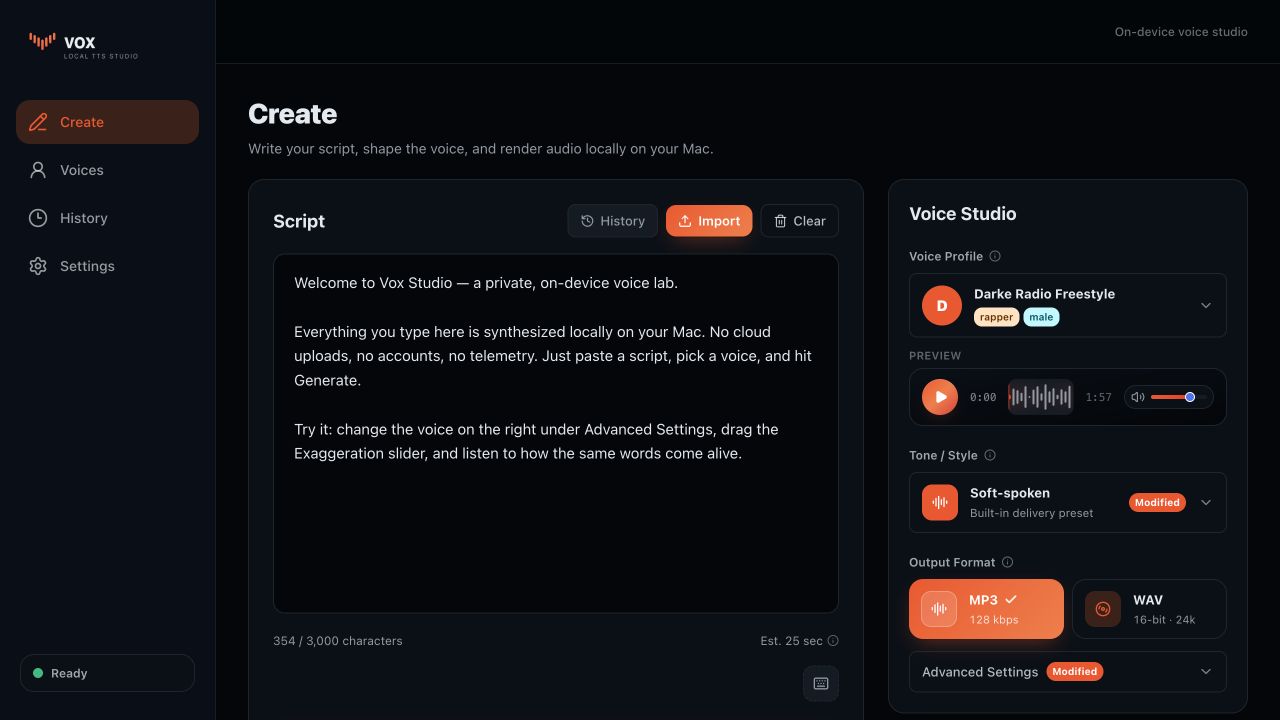
Vox Studio gives you a local studio for manual voice work and a predictable localhost API for scripts, automations, and AI agent workflows that need private audio generation.
Write or import scripts, choose a voice profile, preview audio, and keep generated clips in a clean local library.
After install, local tools can create jobs, check status, and download audio without sending scripts to a hosted service.
The menu bar helper starts, stops, updates, and monitors the local Vox server from a familiar macOS surface.
Use curl, shell scripts, Shortcuts, or an AI agent skill to generate audio from local text once Vox Studio is running.
Keep the public page focused on install, then let the local app expose full docs once Vox is running on the user’s Mac.
Read the Vox AI agent skill for a compact integration guide.
curl -X POST http://localhost:8000/api/v1/tts \
  -F "text=Hello from Vox Studio." \
  -F "voice_name=noelmo-demo" \
  -F "preset=default"

curl http://localhost:8000/api/v1/jobs/{request_id}

curl -L http://localhost:8000/api/v1/jobs/{request_id}/audio \
  --output voice.mp3